


After creating two signature physical journals — Travel Mode Journal and Her Travel Story — AbouTravel. now introduces a Digital Travel Journal for those who prefer a more flexible, on-the-go experience. Designed with the same love for travel, it brings everything you need into one beautifully organized space.
Plan your trips, capture each moment, add photos, and revisit your memories anytime.
Whether you prefer pen and paper or digital convenience, you now have the freedom to choose the journal that fits your travel style.
📍SPECIFICATIONS
→ Digital PDF Travel Journal
→ 147 unnumbered pages
→ Instant download (ZIP file)
→ Includes:
-
Digital Journal
-
Instructions Guide (PDF)
→ Designed for use on tablets, iPads, phones, or computers
→ Compatible with note-taking apps like GoodNotes and Noteshelf
→ Printable for handwriting use
.png)
❤️ WHAT MAKES THIS JOURNAL SPECIAL
Designed with both organization and creativity in mind, this journal includes 10 Trip Sections and gives
you everything you need to plan, document, and remember your travels. You can duplicate
any page or even entire trip sections — giving you unlimited space for future adventures.
Buy it once, use it forever!

The Journal Features:
✔ Beautiful cover design
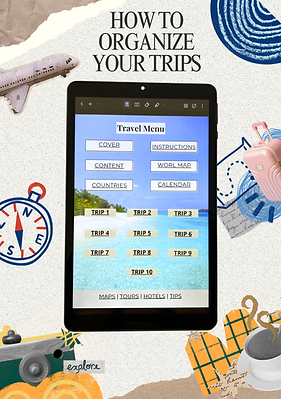
✔ Interactive Menu Page for easy navigation
✔ World map to visualize your journeys
✔ Travel calendar for planning future trips
✔ Dedicated sections for 10 individual trips
Each Trip Is Organized Into 14 Pages:
✍️ Trip Details & Planning Pages
✍️ Packing List
✍️ Daily Itinerary (up to 12 days)
✍️ Notes & Reflections Pages
✍️ Memory Pages for photos
✍️ Expense tracker to stay on budget
✍️ Trip Review & Highlights
📕 HOW YOU'LL USE IT
Getting Started Is Simple:
-
Download your files instantly after purchase
-
Open the journal in your preferred app
-
Start typing or writing directly
on the pages
-
Duplicate pages if needed
-
Insert your favorite photos
-
Use the interactive menu to navigate easily
→ After purchase, read the included
Instructions PDF for a smooth start.
COMPATIBLE APPS
For The Best Experience,
We Recommend:
-
GoodNotes (iOS & Android)
-
Noteshelf (iOS & Android)
-
Noteful (iOS only)
-
Adobe Acrobat (iOS, Android, Windows, Mac)
→ Free apps and free plans can
be used with limited functionality.
→ If you prefer writing on paper, you
can print the Digital Journal PDF.
WHY CHOOSE A DIGITAL TRAVEL JOURNAL?
Keep All Your Trips In One Place
-
Customize with colors, highlights, and labels
-
Duplicate pages for unlimited use
-
Add photos and notes together
-
Access anytime on your device
-
Edit and update easily
.png)
Your Travel Journey, Step by Step
Whether it’s a weekend getaway or a dream vacation, the journal captures your travel in a thoughtful, organized and inspiring way.
Plan Your Trip
Fill in the travel checklist and trip planner with things to check and places to see, eat & shop. Map out your itinerary with all the important details.
Add Photos & Notes
Two dotted pages invite you to insert photos from your device. Keep your favorite memories alive by combining writing with images. Place your photos anywhere on the page, adjust their size, and duplicate pages whenever you want to create more space for your memories.
Capture Each Day
Write down daily highlights & reflections. The journal offers space for up to 12 travel days but you can duplicate or delete itinerary pages to adapt it to your needs.
Review & Dream
Break down your expenses in the budget tracker, rate your trip, note favorites and any negatives, add your next dream destinations to your bucket list.
✈️ BONUS FEATURES
-
World Map - space to pin the places you’ve visited & mark your wishlist countries
-
Travel Calendar – plan future adventures
-
Visited Countries Table – track your personal travel history
-
External Links to Maps, Tours,
Hotels & Travel Tips
💖 PERFECT FOR
-
Travel lovers and frequent travelers
-
Digital planners and journal enthusiasts
-
Anyone who wants to keep their trips organized in one place
-
Those who prefer planning and
writing on their devices
💰 SAVES MONEY
-
Use this digital journal for unlimited number of trips by duplicating pages anytime.
-
One purchase gives you a travel journal you can use again and again — for years to come, making it a smart and cost-effective choice.
.png)
.png)

Frequently Asked Questions
What if I change my device?
No worries! Your completed journal is stored in your note-taking app. If you use a compatible app such as GoodNotes or Noteshelf with cloud sync enabled, your journals can be restored on your new device when you sign in with the same account. This applies when changing devices, including moving to a new iPhone, iPad, tablet, or Android device (depending on the note-taking app you use). For extra peace of mind, you can also export completed trips as PDF files and save them on your computer or external storage for long-term safekeeping.
Will I lose years of travel memories?
No, as long as cloud sync is enabled in your note-taking app or you keep exported PDF backups. Your completed travel journals can stay with you even when you change devices.
Can I add more trips?
Yes! You can continue using the journal for unlimited future adventures. You have two options: 1. Duplicate trip sections within your current journal to add more trips. 2. Import a new copy of the original PDF into your note-taking app and start a fresh travel journal while keeping your previous trips safely stored. After completing the 10th trip section, many users may find it more convenient to start a new copy of the journal. This keeps the navigation links organized and makes it easier to access each new trip, while your previous travel memories remain safely saved.
Can I keep my completed travel journals?
Yes. Your completed journals remain saved in your note-taking app, so you can revisit your travel memories anytime.
Can I export my completed journals as PDF files?
Yes. Once you've finished a trip, you can export it as a PDF to create a permanent copy for your computer, external drive, or cloud storage.
Can I restore my trips if my device breaks down?
Yes, as long as cloud sync or backup is enabled in your note-taking app. Your completed travel journals can be restored on a new device when you sign in with the same account. For additional security, you can also export completed trips as PDF files and save them on your computer or external storage as a permanent backup of your memories.
If you have any questions or need assistance, feel free to contact us at: meaboutravel@gmail.com
.png)
.png)
Choose Your Travel Style
📖 Physical Journals – for writing by hand
📱 Digital Journal – for planning and journaling on your device
.png)
_edited.jpg)
Hello, Which app do you recommend to use? I can't decide between GoodNotes and Noteshelf?
This is incredible! It's very useful and fun to do. I love it 😍😍😍
Awesome! I use it with Good Notes. 👍